
Here's something nobody tells you when you start using AI for coding: the quality of what comes out is entirely determined by the quality of what goes in. Not the model. Not the version. Not even which tool you pay for.
I spent three months watching developers — juniors, seniors, even CTOs — get frustrated with AI output. Inconsistent code. Wrong library versions. Half-finished implementations that work in demos and collapse in production. In almost every case, the problem wasn't the AI. It was the prompt.
This guide is the result of that research. The 6-layer framework you're about to learn isn't theory — it's what engineers who consistently ship clean, production-ready AI output actually do, distilled into a repeatable system you can use from today.
Why Your Prompts Are Failing
Most developers write prompts like they're texting a colleague who already knows everything about their project:
"Hey can you write me a user authentication component"
No framework. No language version. No idea if this is a mobile app or enterprise SaaS. The AI isn't being lazy when it returns a generic React component using an outdated library — it's doing the best it can with almost nothing to go on.
The mental model shift: think of AI like a brilliant contractor who just arrived on your project today. Talented. Willing to work hard. But completely in the dark about your codebase, standards, and users. Your job is to give a briefing so thorough that the contractor can hit the ground running without asking anything back.
.png)
"The AI isn't the variable. The prompt is the variable. Once I understood that, everything changed."
— Arjun K., Senior Engineer, 8 years experienceThe 6-Layer Framework
Every time you prompt AI for code, you're filling six invisible fields. Most people leave four or five blank.
Layer 1 — Role: The Most Underestimated Line
A single opening line shapes everything that follows. "You are a senior engineer" activates a different response mode entirely — you get architectural opinions, trade-off analysis, proactive edge case flagging. The difference is measurable and immediate.
But generic role-setting is just the start. "Senior fullstack engineer who has spent 5 years building multi-tenant SaaS and cares deeply about maintainability" gives the AI a genuine point of view to reason from.
Add "You think like a founder" to your role line. Engineers who also think commercially make better architectural decisions — considering cost, scalability, and UX simultaneously rather than optimizing for technical elegance alone.
Layer 3 — Tech Stack: Version Numbers Are Not Optional
They say "React" when they mean "React 19." They say "Next.js" when they mean "Next.js 15 with the App Router." The AI makes assumptions, and those assumptions bite you.
I watched a developer spend two full days debugging an authentication flow because the AI gave them NextAuth v4 patterns in a v5 project. The code looked plausible. It ran — until it didn't. One version number in the prompt would have prevented the entire ordeal.
Layer 4 — Constraints: The Layer Nobody Uses
This produces the most dramatic improvement the fastest — and almost everyone skips it completely.
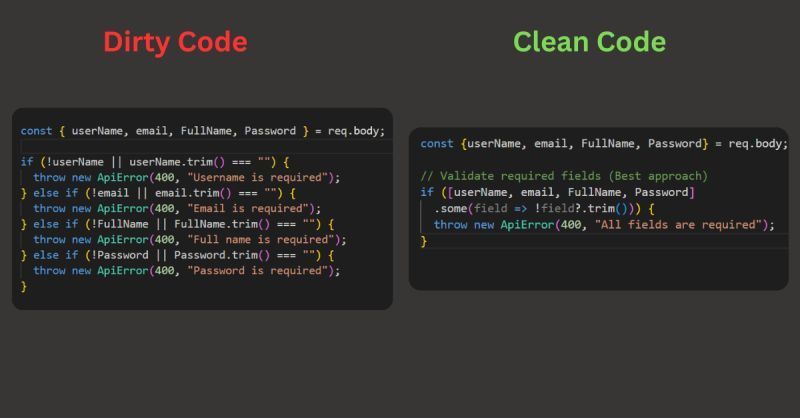
We focus on what we want, not what we don't want. But AI defaults to whatever patterns are most common in training data. Those patterns are rarely what a senior engineer would write. When you add constraints, you're drawing a boundary around the solution space that forces higher-quality output:
- No
anytypes — forces genuine TypeScript thinking - No partial implementations — forces complete, runnable files
- No magic numbers — forces readable, maintainable code
- No
console.login production — forces proper logging - No inline styles — enforces design system consistency
Don't retype constraints every session. Put them in a saved template and paste in 5 seconds. Constraints are standing rules — treat them like your team's coding standards document.
The Master Prompt Template
Copy this. Customize the brackets. Use it every time. 5 minutes of setup, months of better output.
You are a senior [frontend/backend/fullstack] engineer with 10+
years building production SaaS. You think like a founder.
No shortcuts. No partial code. Ever.
## 🏢 PROJECT CONTEXT
Project: [App name]
Description: [1-2 sentences]
Users: [Who, tech level, age]
Model: [B2B / B2C / marketplace]
Scale: [100 / 10K / 1M+ users]
## 🛠 TECH STACK
Frontend: Next.js 15 / React 19 / [choice]
Language: TypeScript 5.4 strict
Styling: Tailwind CSS 3.4
Backend: Node.js 22 / Bun / [choice]
DB: PostgreSQL + Prisma 5 / Supabase
Auth: Clerk / NextAuth v5
Deploy: Vercel / Railway / [choice]
## ✅ CODE STANDARDS
- Functional components + hooks only
- All async: loading + error + empty states
- Semantic HTML + ARIA (WCAG AA)
- Mobile-first 375px to 1440px
- Named constants, JSDoc on every export
## 🚫 NEVER
- No: any, var, !important, inline styles, console.log
- No: unhandled promises, missing try/catch
- No: deprecated APIs, hardcoded secrets, partial code
## 📦 OUTPUT
Full files with path. Dependency order.
After code: WHAT / WHY / EDGE CASES / NEXT STEP
## 🎯 TASK
[Surgical description: component, data, interactions,
connections, what success looks like]
Before and After — Real Examples
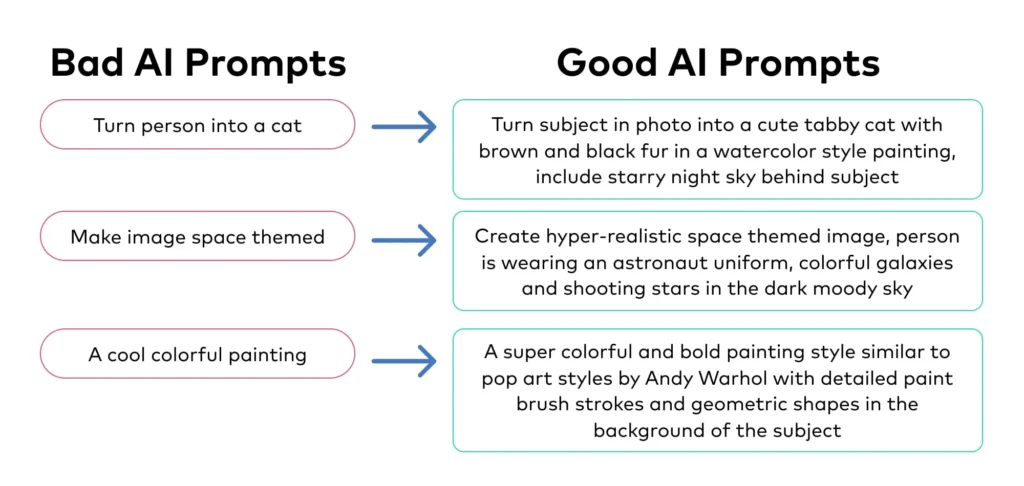
Same AI, same model, same task. Completely different results.
| Aspect | Without Framework | With Framework |
|---|---|---|
| Prompt | "Build me a login form" | Full 6-layer: Next.js 15, NextAuth v5, error states, strict TypeScript |
| Output | Generic HTML, no error handling, outdated library | Complete page.tsx + auth config, loading skeleton, toast notifications, accessible markup |
| TypeScript | Lots of any, implicit types | Fully typed, Zod validation, zero any types |
| Edge Cases | None handled | Network errors, expired session, rate limit, account not found |
| Time to Ship | 2–4 hours of cleanup | 30–45 minutes |
Power Moves — Phrases That Change Everything
Beyond the framework, specific phrases unlock qualitatively different responses. Not tricks — honest requests that happen to produce dramatically better output.
- "As if this ships to 100,000 users tomorrow"
Activates production-thinking. The AI starts worrying about edge cases and failure modes it wouldn't otherwise consider. - "Tell me if my approach is wrong before you start coding"
Catches architectural mistakes before they're embedded in 200 lines of code. The AI will often push back with a better approach — but only if invited. - "What am I not thinking about here?"
Ask this after getting working code. Surfaces security issues, race conditions, accessibility problems not in your original spec. - "Assume I want the robust version, not the simple version"
AI defaults to simplicity. This overrides that. You'll get error handling, retry logic, and proper state management without requesting each one separately. - "Review this as a principal engineer would in a PR"
Real critique — naming issues, logic flaws, missing tests, performance concerns. The closest thing to a free senior code reviewer.
"Build this as if it ships to 100K users tomorrow, and tell me what I'm not thinking about before you start" — 8 seconds to type, saves 3 hours of debugging.
The 5 Mistakes Killing Your Output
Mistake 1 — Fresh Start Every Session
Retyping your stack and standards every chat wastes 10 minutes a day and produces inconsistent results. Save your template. Paste in 5 seconds. Done.
Mistake 2 — Accepting the First Response
The first response is a draft. Always follow up: "What edge cases didn't you handle?" The AI isn't offended — it's waiting for this question.
Mistake 3 — Vague Success Criteria
"Build me a dashboard" gives AI nothing to optimize for. "Dashboard loading under 2 seconds with empty states and skeleton loaders" gives specific, testable goals to hit.
Mistake 4 — Skipping Output Format
Without format instructions you get whatever the AI feels like — sometimes 400 lines, sometimes 10 with "expand as needed." Specify: full files, paths, JSDoc, structured explanation after the code block.
Mistake 5 — Using AI as a Search Engine
"How do I set up NextAuth v5?" gets documentation. "Set up NextAuth v5 in my Next.js 15 project with Google OAuth, magic link, protected routes, and session middleware — here's my file structure" gets working code.

⚡ Key Takeaways
- The 6-layer framework is the difference between a prompt and a proper brief
- Version numbers in your stack prevent an entire category of bugs before they happen
- Constraints are the most underused layer — adding them causes immediate quality jumps
- Five phrases: "100K users", "tell me if I'm wrong", "what am I missing", "robust version", "PR review"
- Business context produces better architecture — not just better code style
- The first response is always a draft — follow-up questions close the gap to production-ready